Custom-Built PCs: Why Going Custom Beats Off-the-Shelf
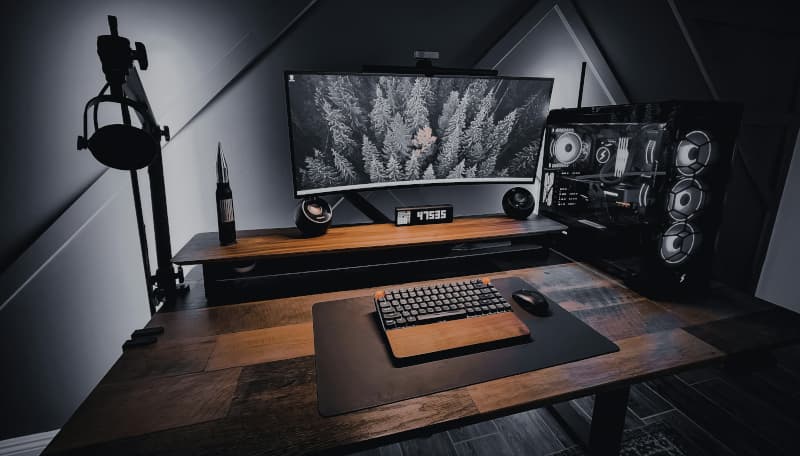
Introduction: The Case for Custom-Built PCs
In a world where pre-built computers are available at every electronics retailer, the decision to build a custom PC might seem like an unnecessary complexity. However, for those who understand the value of tailored performance, longevity, and cost-effectiveness, custom-built PCs offer advantages that off-the-shelf systems simply cannot match. Building your own computer allows you to select every component with precision, balancing performance, quality, and budget to create a system that perfectly matches your needs and preferences. This level of customization is particularly valuable for users with specific requirements.
Custom PC building has evolved significantly over the years. What was once a niche hobby reserved for tech enthusiasts has become more accessible to a broader audience. Component compatibility has improved, installation processes have been streamlined, and countless online resources guide builders through every step. Additionally, the performance gap between custom and pre-built systems has widened, particularly at higher performance tiers where off-the-shelf options often cut corners to maintain profit margins.
The benefits of custom-built PCs extend beyond pure performance. Customization allows for aesthetic choices that reflect personal style, quiet operation through careful fan and component selection, and future upgradeability that extends the useful life of the investment. For businesses, custom workstations can be optimized for specific software applications, ensuring maximum productivity and return on investment. Whether for gaming, content creation, software development, or general productivity, a custom-built PC delivers a superior experience.
Performance Advantages of Custom Builds
Performance is the primary reason most users choose custom-built PCs. When you build your own system, you select each component to meet your specific performance requirements. This means choosing the right processor for your workloads, selecting adequate memory for multitasking, ensuring fast storage for quick load times, and picking a graphics card that handles your visual demands. Pre-built systems often make compromises to hit price points, using lower-tier components or proprietary parts that limit performance. With custom builds, every component is chosen for a purpose.
Another performance advantage is the ability to overclock components for additional performance. Custom builders often select unlocked processors and motherboards that support overclocking, along with robust cooling solutions that handle the additional thermal output. This can provide a significant performance boost at no additional hardware cost. Pre-built systems typically restrict overclocking or use motherboards with limited BIOS options, preventing users from extracting the maximum performance from their hardware.
Cooling is a critical performance factor often overlooked in pre-built systems. Custom builders can select high-quality air coolers, all-in-one liquid coolers, or custom water cooling loops that keep components running at optimal temperatures. Better cooling not only improves performance by preventing thermal throttling but also extends component lifespan. In contrast, pre-built systems often use inadequate or noisy cooling solutions to reduce costs. The result is a system that runs hotter, louder, and potentially slower than its custom-built equivalent.
Cost Efficiency and Value
Contrary to common perception, custom-built PCs often offer better value than pre-built alternatives. Building your own computer allows you to allocate your budget exactly where it matters most for your use case. For example, a video editor might invest more in a powerful processor and ample memory, while a gamer might prioritize a high-end graphics card and fast storage. This targeted allocation ensures you're paying for performance you'll actually use, rather than for components that add little value to your specific workflows.
Savings come from multiple sources in custom building. By purchasing components separately, you can take advantage of sales, bundle deals, and manufacturer promotions. You also avoid the assembly and branding markups included in pre-built prices. Furthermore, you have control over component quality—choosing reputable brands with solid warranties rather than accepting unknown parts that pre-built manufacturers sometimes use. The result is often a system that costs less than a comparable pre-built while offering superior performance and quality.
The long-term cost picture also favors custom builds. When a component becomes outdated or fails, you can replace it individually rather than replacing the entire system. This upgradeability extends the useful life of your investment and reduces total cost of ownership over time. Pre-built systems often use proprietary motherboards, power supplies, or cases that limit upgrade options, forcing more expensive replacements. For those who update their computers periodically, custom builds represent significant long-term savings.
Customization: Aesthetics and Ergonomics
Beyond performance and cost, customization allows you to create a computer that reflects your personal aesthetic preferences. From sleek, minimalist designs to RGB-laden gaming rigs with tempered glass panels, the possibilities are nearly endless. Component manufacturers offer a wide range of colors, finishes, and lighting options. Custom cable management, coordinated component colors, and unique case designs allow builders to create visually stunning systems that are as pleasing to look at as they are to use.
Ergonomics also benefit from customization. Choosing a case with optimal airflow, component placement, and noise isolation creates a more comfortable computing environment. For users who spend long hours at their computers, a quiet, cool-running system reduces fatigue and improves focus. Custom builders can select components specifically designed for low-noise operation, including quiet fans, rubber-dampened drives, and sound-dampening case materials. These considerations are often neglected in pre-built systems.
Customization extends to the peripherals and workspace setup as well. Builders can choose monitors that match their needs (color accuracy, refresh rate, resolution), keyboards and mice that feel comfortable, and audio solutions that suit their preferences. This holistic approach to customization ensures that every aspect of the computing experience is optimized. For businesses, this can translate to improved employee satisfaction and productivity when workstations are tailored to individual workflows and preferences.
The Building Process: What to Expect
Building a custom PC is a rewarding process that many find enjoyable and educational. The first step is planning: determining your budget, use case, and performance requirements. This guides component selection, ensuring compatibility and value. Resources like PC Part Picker simplify compatibility checking, while online forums and reviews help inform decisions. Taking time to plan carefully results in a smoother building experience and a system that meets expectations.
The physical assembly involves installing the motherboard, processor, memory, storage, graphics card, and power supply within the case. While this may seem daunting to beginners, modern components are designed for straightforward installation with standardized connectors and clear documentation. Most builders complete their first system in a few hours. Online video guides provide step-by-step instructions, and communities offer support for any questions that arise. The process builds technical confidence and understanding.
After assembly comes installation of the operating system, drivers, and software. This final step brings the system to life and allows for testing to ensure everything functions correctly. Builders can also optimize BIOS settings for performance, configure storage arrays, and install essential utilities. The sense of accomplishment from completing a custom build is significant, and the knowledge gained proves invaluable for future upgrades and maintenance.
Conclusion: Is a Custom-Built PC Right for You?
Custom-built PCs offer advantages that make them the preferred choice for many users. The combination of performance optimization, cost efficiency, customization options, and upgradeability creates value that pre-built systems struggle to match. For those with specific performance requirements—whether for gaming, content creation, software development, or professional applications—custom builds deliver precisely targeted performance that off-the-shelf options cannot provide.
However, custom building is not for everyone. It requires time, research, and a willingness to learn. For users who need a computer immediately or who prefer a complete warranty covering the entire system, pre-built options may be more suitable. Additionally, some users simply prefer the convenience of ready-to-use systems. The decision ultimately depends on individual priorities, technical comfort level, and specific needs.
For those considering a custom build, the resources available today make it more accessible than ever. Communities like Reddit's r/buildapc, extensive YouTube tutorials, and online compatibility tools provide all the support needed. The result—a computer that perfectly matches your needs, performs exceptionally, and reflects your personal preferences—makes the effort worthwhile. Whether you're a first-time builder or an experienced enthusiast, a custom-built PC remains the gold standard for computing excellence.